New: desktop dashboard, Sales role, full Spanish + Portuguese. Open the dashboard →
Home · Who we serve · Electricians
For electricians

Panel upgrades, service calls, and inspections in one phone app.

Load calc PDFs stay on the job. Permits pull to the same screen. Circuit-per-room notes stick to the panel schedule. Deposit hits the account the same hour you sign the customer.

Built for sparkies running projects plus service. Not a dispatch grid.
Workhand panel upgrade estimate with material markup on iPhone
Made for electricians

Every panel, every permit, every ticket.

Load calc PDF on the job

Run the load calc in your NEC tool of choice. Attach the PDF to the job. It stays with the panel schedule, the permit number, and the install photos for the life of the record.

Panel schedule attached

Type the schedule right on the job. Circuit number, amperage, room, dedicated or shared. Prints clean for the panel door and lives on the job history for the next tech.

Permit pulls tracked

Permit number, AHJ, inspection scheduled date, and pass-through fee all attach to the job. Inspector shows up, you pull it in two taps. Nothing lost between the AHJ portal and the truck.

Circuit-per-room notes

Every room note logs which circuit feeds it. Recessed cans on 12, kitchen counter GFCI on 14, garage door opener on 18. Homeowner asks two years later, you have the answer.

Service call vs new construction

Service call runs as a one-day ticket with instant invoice and Stripe pay. Panel upgrade or new construction runs as a project with phases (rough-in, trim, final). Same app, right template every time.

Instant invoice, Stripe pay

Wrench down, tap Invoice, homeowner taps Pay Online. Card charges before you close the panel cover. Stripe Connect funds hit your bank in two business days. No net-30 on a $185 service call.

Every job, every phase

From estimate to inspection pass, one screen.

1

Walk and quote

Walk the job. Pull line items from your materials catalog (200A panel, breakers, THHN, fixtures). Attach the load calc PDF. Send the estimate before you leave the driveway.

2

Sign and deposit

Customer signs on your phone. Deposit invoice sends. Stripe charges the card. Money in your bank in two business days. All before you pull off the curb.

3

Permit and rough-in

Permit number attaches to the job. Rough-in photos auto-stamp with time and location. Panel schedule types straight on the job. AHJ inspection scheduled, all in one thread.

4

Trim and final

Trim-out photos, final inspection pass, panel schedule printed for the panel door. Final invoice converts from the signed estimate. Homeowner pays online. Job closes.

Material markup, kept honest

Cost stays yours. Sell price is what the customer sees.

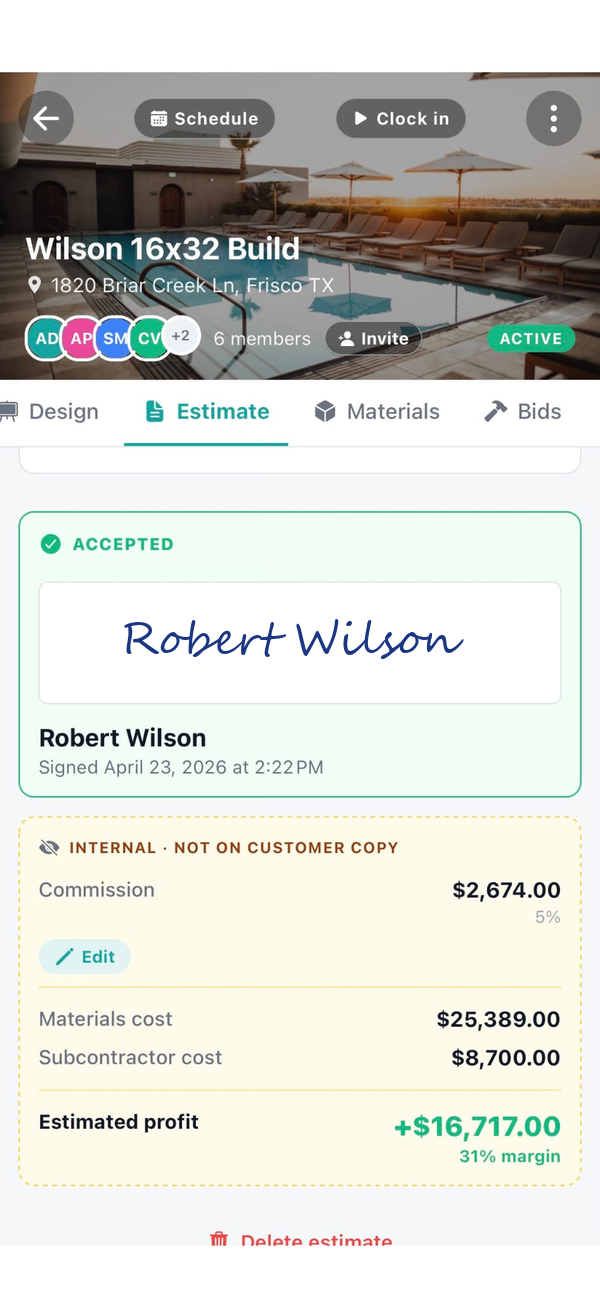
Build your materials catalog with cost and sell price per SKU. Copper THHN by gauge. Breakers by amperage. Panels by size. Workhand shows the marked-up price on the customer estimate and invoice. Job costing reports show your cost so profit per job is real.

  • Cost price stays internal. Never prints on the customer document.
  • Sell price is what the estimate and invoice show.
  • Job costing tracks cost, sell, labor, and margin per job.
  • Permit fees can flag as pass-through. Zero markup, shown separately on the invoice.
See estimates in detail →
Panel upgrade estimate with material cost and sell price
Also serves

Same app, different trade.

Frequently asked

Straight answers, no gate.

Can I track material markups on panel upgrades?
Yes. Build your materials catalog with cost and sell price per SKU (200A panel, breakers by amperage, copper THHN by gauge, fixtures, switchgear). Workhand stores cost and markup separately. The customer estimate shows the marked-up price only. Internal job costing shows the cost so you can see actual margin per job after labor. Cost price stays internal and never prints on the customer invoice.
How does permit fee pass-through work on the invoice?
Add the permit fee as a line item flagged pass-through. The customer sees it as a separate line on the estimate and invoice, no markup applied. You attach the permit number to the job so the inspector reference is in the same place as the install photos. When the AHJ wants documentation, you pull it from one screen.
Can I send an invoice the second a service call is done?
Yes. Finish the troubleshoot, tap Invoice, the line items pull from your service catalog (diagnostic fee, hourly, parts). Customer gets the invoice email with a Pay Online button. Stripe Connect funds to your bank in two business days. From wrench-down to invoice-sent is under a minute, which is what you want on a $185 service call that does not deserve a net-30 cycle.
Does Workhand handle inspection-grade photo logs?
Yes. Photos taken inside the job auto-stamp with date, time, and GPS location. Tag them by phase (rough-in, trim, final inspection) and they stay tied to the job for life. When the AHJ asks for a before-and-after on a panel relocation or wants to see grounding electrode conductor terminations, you have it in your phone and the customer-facing portal.
Can I split a commercial job between my crew and a sub?
Yes. Add subs to the job with their scope (low-voltage, fire alarm, data) and Workhand tracks their COI status and bid versus actuals separately from your own labor. Sub invoices come in against the job for costing. Your crew time tracks against your labor cost. Profit per job comes out clean.
Is Workhand a replacement for ServiceTitan?
If you run a pure-service dispatch shop with 8 to 15 service calls per tech per day, no. ServiceTitan is built around the dispatch grid, call-by-call routing, and price book selling. Workhand is for electricians whose work is a mix of projects (panel upgrades, rewires, new construction rough-in) plus some service calls. The job runs as a project with phases, photos, and a portal, not a one-hour ticket.
Do you do load calcs or code-section references?
No. Workhand is field operations and money flow, not engineering. For load calcs use your existing tool (CodeCheck, ConductorPro, NEC apps). Workhand attaches the PDF of the load calc to the job so the documentation stays with the work.
Sign the next panel upgrade in the driveway.

Free forever plan, no credit card. Pro trial is 14 days. Cancel any time.