How does the customer portal work in Workhand?
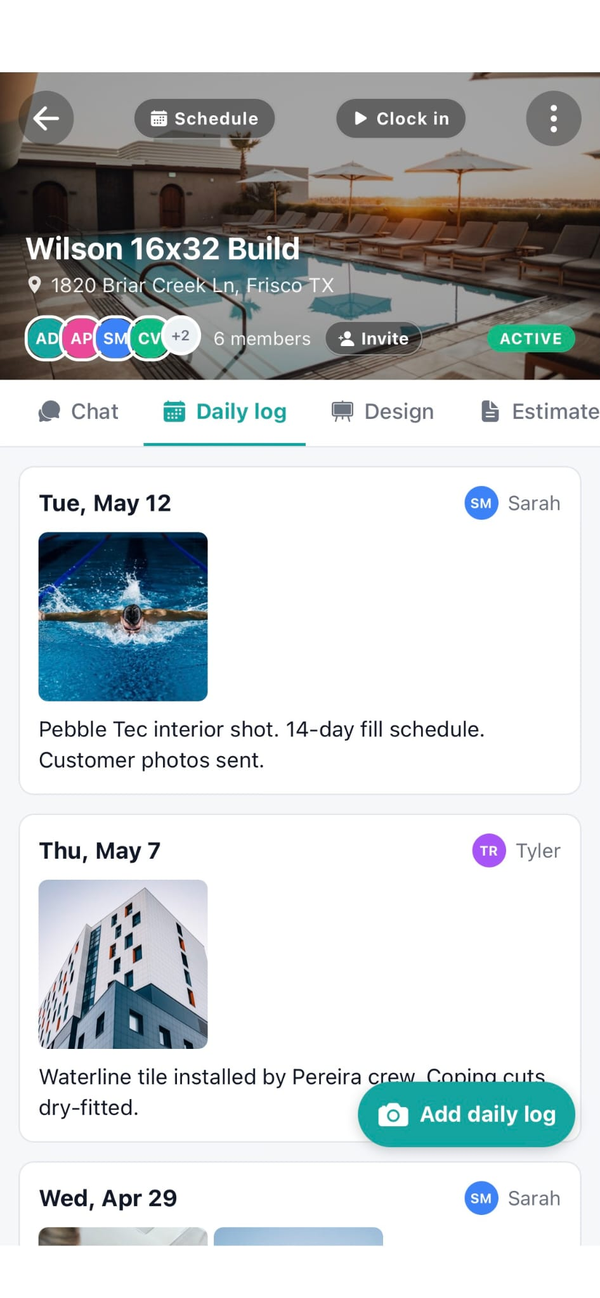
When you create a job, Workhand generates a private portal link tied to that customer and job. You send the link by text or email. The customer taps it on their phone and sees yesterday's photos, today's schedule, the current selections sheet, any pending change orders, and the estimate plus invoice history. No login, no app to install, just the link.
Does the customer need to create an account?
No. The link is the access. Most homeowners will not download a contractor app for one project, so Workhand uses a tokenized URL instead. The link is private to that customer and that job. You can revoke or rotate it from the job page if you need to.
What does the customer actually see?
Daily progress photos that your crew uploaded, the schedule for today and the next 7 days, the current selections sheet showing paint colors and fixtures and tile and any other choices, any change orders waiting for their signature, and the estimate plus all invoices and payments. They do not see your internal team chat, your costs, or your margin.
How does the portal cut down on customer texts?
Most update texts ask three things. What got done yesterday, when are you coming back, and what are we doing next. The portal answers all three at a glance with the photo feed and the schedule view. Once homeowners trust the portal is current, the texts drop sharply. Most users see roughly 80 percent fewer status check-in texts within a couple weeks.
Can the customer approve change orders from the portal?
Yes. When you create a change order on a job, it appears in the portal with the description, the price impact, and a signature field. The customer taps to approve, signs with their finger, and the signed change order is locked into the job record. No more 'I never agreed to that' fights at the end.
What happens if I do not want the customer to see something?
Photos are opt-in per upload. The crew uploads to the job, then chooses whether each photo is portal-visible or internal only. Selections, schedule, and financial documents are configurable per customer. Internal team chat is never visible in the portal under any setting.
Is the portal mobile-friendly?
Yes. Most homeowners check the portal from their phone while they are at work, so the layout is built phone-first. Photo galleries swipe, schedule is a clean weekly view, change orders are big tap targets. It works fine on a desktop too but the phone is the priority.
How much does the customer portal cost?
Included on every plan, including the Free plan. Free covers one active job, which means one active customer portal. Pro at $34.99 per month covers unlimited jobs for up to 5 users. Team at $89.99 per month covers up to 15 users. There is no per-portal cost and no cap on photos or change orders.