New: desktop dashboard, Sales role, full Spanish + Portuguese. Open the dashboard →
Home · Who We Serve · General Contractors
For general contractors

Run six subs on three jobs from the truck. Nothing dropped.

COI expiration alerts at 30, 14, and 7 days. Change orders signed the same day. Milestone draws to the deposit, drywall, trim, and final. Built for the residential GC running $200K to $3M jobs.

Free forever plan. No credit card.
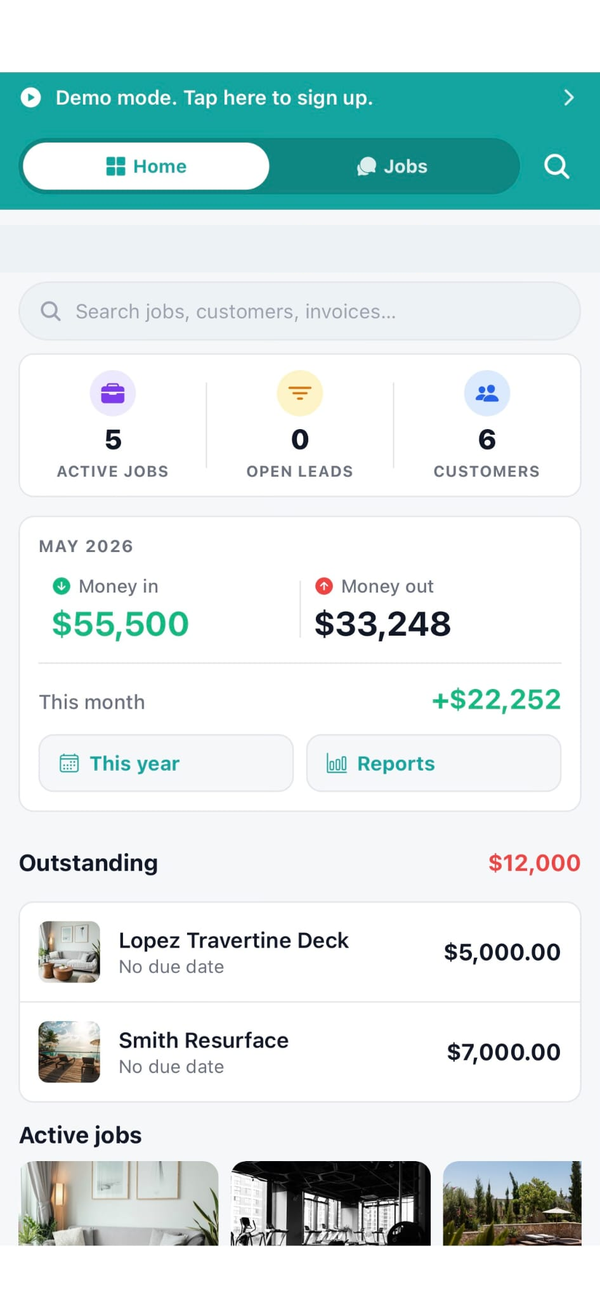
Workhand home dashboard for a GC running multiple jobs
Made for GCs

Sub management, COIs, draws. The stuff a real job runs on.

COI tracking, 30/14/7 alerts

Subs upload their General Liability, Workers' Comp, and W-9. Workhand pings you 30 days before expiration, again at 14, again at 7. No sub works uninsured because of a missed calendar reminder.

Sub coordination per job

Framer, plumber, electrician, drywall, trim, paint. Each sub gets a free seat on the jobs they're assigned to. They see the schedule, the plans, and the punch list. No group text chaos.

Change orders that hold up

Scope walks. New request from the homeowner. Add a change order, they e-sign, it lands on the job total and flows to the next invoice. Original contract stays clean.

Milestone draws

Deposit, framing complete, drywall, trim, final. Mark a milestone done on your phone, Workhand generates the draw invoice. Customer pays online through Stripe.

Sub payment tracking

Each sub's contract total, what's been paid, what's owed for the next draw, all on one line per sub. When the framer asks where his second draw is, you know.

Role-based cost visibility

Owner and Office see costs and margins. PMs can be set to see costs or not. Employees and subs never see internal margin data. Same job, different views.
Every job, every phase

Signed contract to final walkthrough

1

Signed and set up

Estimate signed, deposit charged, sub COIs verified, kickoff meeting scheduled. Job goes from lead pipeline to active in one tap.

2

Demo and rough-in

Framer scheduled, plumber and electrician follow. Daily log with weather, crew on site, and photos. First draw invoice at drywall.

3

Drywall and trim

Change orders signed on the fly if the homeowner tweaks. Second draw at trim start. Punch list opens for the finish crew.

4

Finish work

Paint, flooring, cabinets, countertops, appliances. Selections locked from the sheet. Photos posted daily to the customer portal.

5

Punch and walkthrough

Punch list cleared item by item. Homeowner walks the job, signs off. Final draw invoice generated. Warranty period opens.

6

Closeout and files

Signed change orders, COIs, invoices, and lien waivers all live on the job record. If the customer calls in six months, everything is one search away.

COI tracking, deep dive

Never let a sub work uninsured again

Sub uploads General Liability, Workers' Comp, and W-9 the first time. Workhand reads the expiration date and puts three alerts on your calendar: 30 days out, 14 days out, and 7 days out. You see status at a glance before you assign the sub to a new job.

  • Three-tier expiration alerts, 30 / 14 / 7 days
  • GL, Workers' Comp, W-9 stored per sub, per policy
  • Insurance status shown on the sub picker before assignment
  • Sub uploads renewal cert on their phone, no chasing
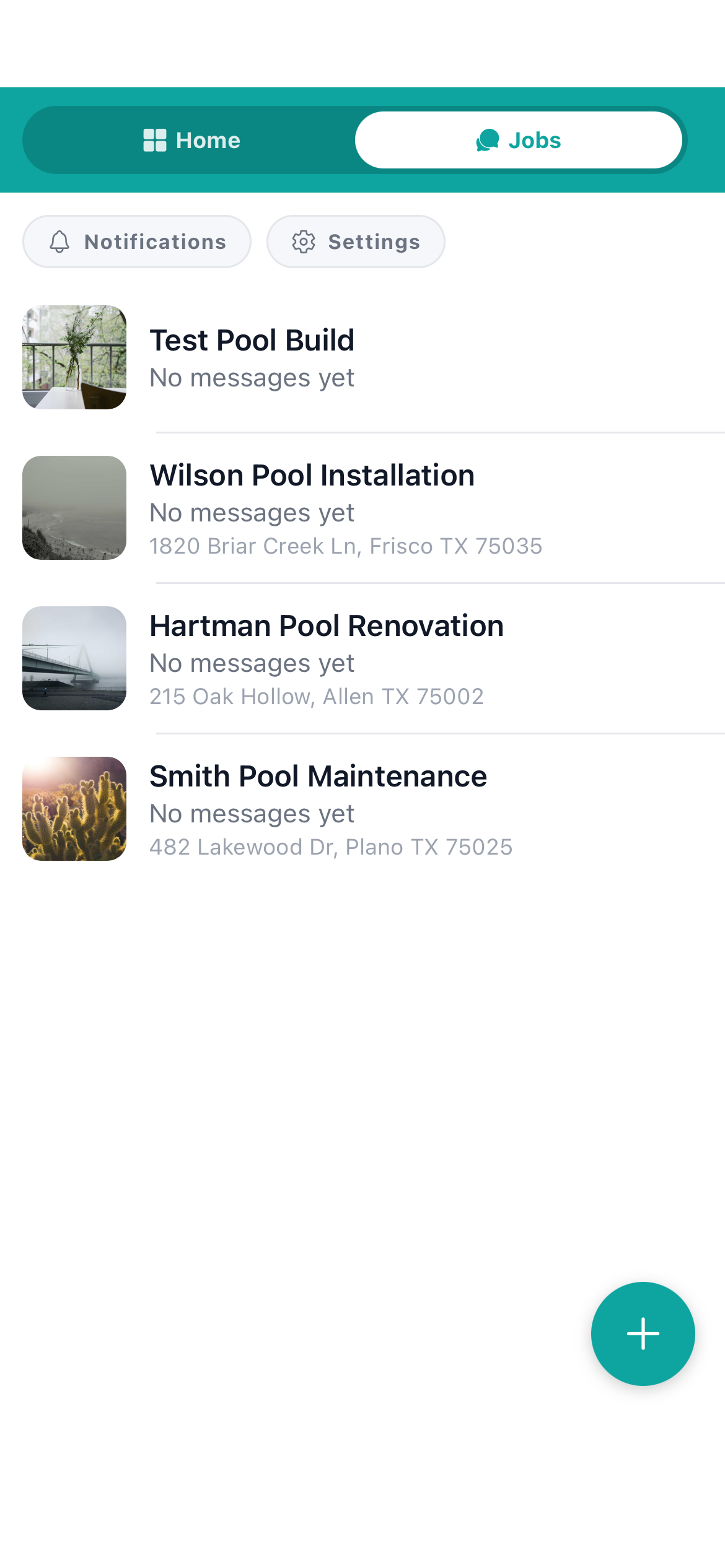
Workhand jobs list with active GC jobs
Also serves

Trades that run alongside a GC

Frequently asked

Questions GCs ask

Is Workhand a replacement for Procore?
No. Procore is enterprise commercial construction software for projects in the $5M and up range with bank-funded draws, AIA billing, and an office full of PMs. Workhand is for the residential general contractor running $200K to $3M jobs, where the owner is also the PM and the whole crew lives on phones. Different shape of business, different tool.
How does Workhand handle subcontractor insurance tracking?
When you invite a sub to a job, they create a free sub account and upload their General Liability certificate, Workers' Comp, and W-9. Workhand stores expiration dates and warns you before any cert lapses. You see a sub's insurance status at a glance before assigning them to a new job.
Can I track change orders separately from the original contract?
Yes. Each change order lives as its own line on the job with its own e-signature and total. The original contract stays intact and you can see exactly how the job's total has grown over time. When you invoice, change orders show as separate line items on the invoice.
Does Workhand do draw schedules?
Workhand supports milestone-based invoicing, which is how most residential GC draws actually work in practice (deposit, drywall, trim, final). You set the milestones, mark each one complete, and Workhand generates the invoice. We do not do AIA G702 / G703 formatted documents for bank-funded commercial draws. If you need those, Buildertrend or CoConstruct is a better fit.
Can my project managers use Workhand without seeing costs?
Yes. Roles are granular. Owner and Office roles see cost prices, profit margins, and commissions. Project managers can be set to either see costs or not see costs. Employees and subcontractors never see internal cost or margin data, even on the same estimate they help build.

Run the next job on it. Free plan, no card.

Free forever plan gets you one active job at $0 per month. 14-day full trial on Pro and Team. Cancel anytime in the app.