New: desktop dashboard, Sales role, full Spanish + Portuguese. Open the dashboard →
Home · Features · Estimates
Feature · Estimates with e-signature

Sign it on the truck. Deposit lands the same hour.

Walk the job. Build the estimate. Customer signs on your phone. Deposit charges via Stripe. All before you leave the driveway.

Included in every plan. Even the free one.
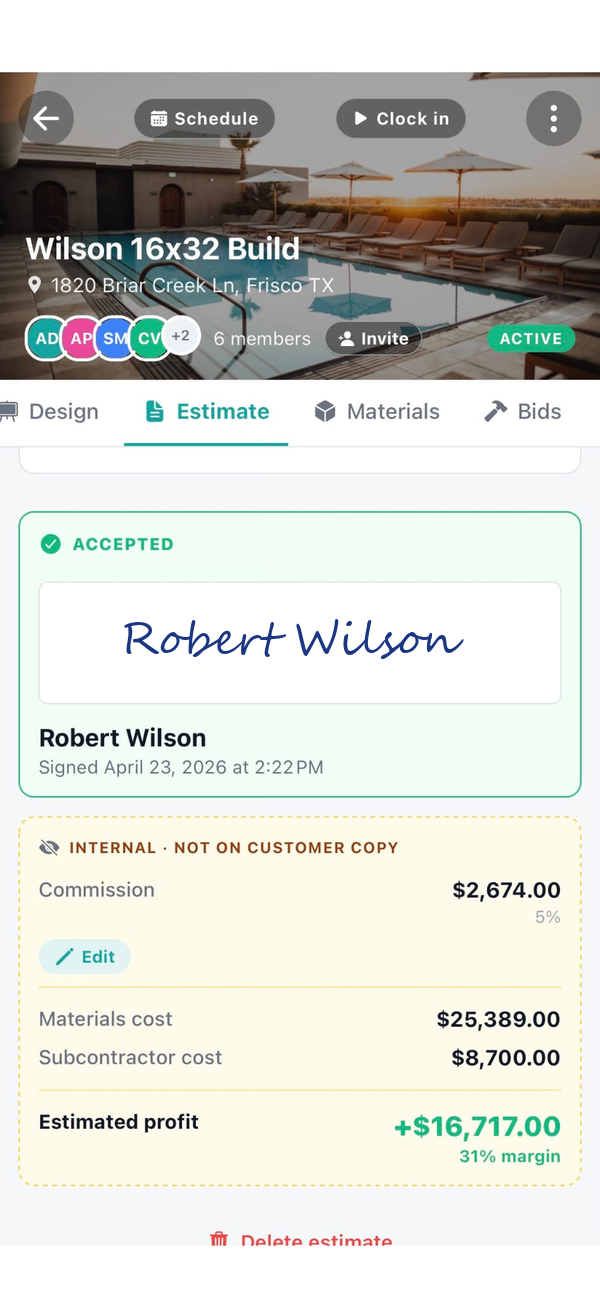
Workhand accepted estimate with profit margin visibility
What it does

Everything a printed estimate does. Nothing you'd fax.

E-signature in the app

Customer types their name, draws a signature, taps accept. Signed PDF stored with the job. No DocuSign account, no separate service.

Line items from library

Stop typing "Gunite" for the tenth time. Save common scope items. Tap to add them. Adjust qty and price on the fly.

Send in the customer's language

Same estimate, one tap to switch. English for the office copy. Spanish or Portuguese for the customer. Zero rework.

Change orders on the same job

Scope grows? Add a change order. Customer signs again. Flows through to the invoice automatically. Nothing falls through the cracks.

Templates for common scopes

Pool deck repaint. Roof replacement. Kitchen remodel. Save each as a template. Cuts estimate time from 45 minutes to 5.

One tap to invoice

Customer signs, tap Convert. Deposit invoice goes out first. Progress and final invoices follow as the job progresses. Zero re-typing.

How it works

Three taps from walkthrough to signature

1

Walk the job

Add line items from your library. Photos attach to the scope automatically. Set tax and deposit percentage.

2

Hand them the phone

Customer reviews on your screen. Signs with their finger. Or you text the link and they sign from their couch.

3

Deposit hits the account

Signed = deposit invoice sent = Stripe charges the card = money in your Stripe balance. Under 30 seconds start to finish.

ESIGN + UETA compliant

A signature that actually holds up

Every signature comes with an audit trail: signer name, timestamp, IP address, and user-agent. Stored with the signed PDF. If a customer ever disputes the scope, you have the evidence.

  • Compliant with US federal ESIGN Act and state UETA laws
  • Signature captured as image data URL, not just a typed name
  • IP + user-agent audit trail stored on the estimate record
  • Signed PDF archived, downloadable any time
Estimate detail with margin
Made for your trade

Every scope. Every specialty.

Frequently asked

Answers, no gate

Can I build a construction estimate from my phone?
Yes. Workhand was built phone-first. Walk the job, add line items from your saved item library, set tax and deposit percentage, and the totals auto-calculate. Send to the customer by email or text before you leave the driveway.
How does customer e-signature work?
The estimate link opens in the customer's browser. They review line items, type their name, draw a signature with finger or mouse, and tap accept. The signed PDF is stored with the job record. No DocuSign account or separate signing service required.
How do I handle change orders?
A change order attaches to the same job as a new line item or a separate change order document. The customer signs the change order the same way they signed the original estimate. The change flows through to the invoice automatically.
Can I save estimate templates for common jobs?
Yes. Save a frequently-quoted scope as a template. When the next similar job comes in, load the template, adjust the line items, and send. Cuts estimate-writing time from 45 minutes to 5.
How does converting an estimate to an invoice work?
Once the customer signs the estimate, tap Convert to Invoice on the job. The line items, tax, and deposit carry over automatically. The deposit invoice goes out first, progress invoices and the final balance follow as the job progresses.
Does Workhand replace QuickBooks for estimates?
For estimating in the field, yes. Workhand sends the estimate in minutes from the truck, then on the Team plan the accepted estimate and its invoice sync back to QuickBooks Online.
What does the estimate feature cost?
Included on every plan. Free includes 1 active job at a time. Pro at $34.99 per month unlocks unlimited jobs for up to 5 users. Team at $89.99 per month covers up to 15 users and adds QuickBooks sync.

Sign the next one in the driveway.

Free forever plan, no credit card. Pro trial is 14 days. Cancel any time.