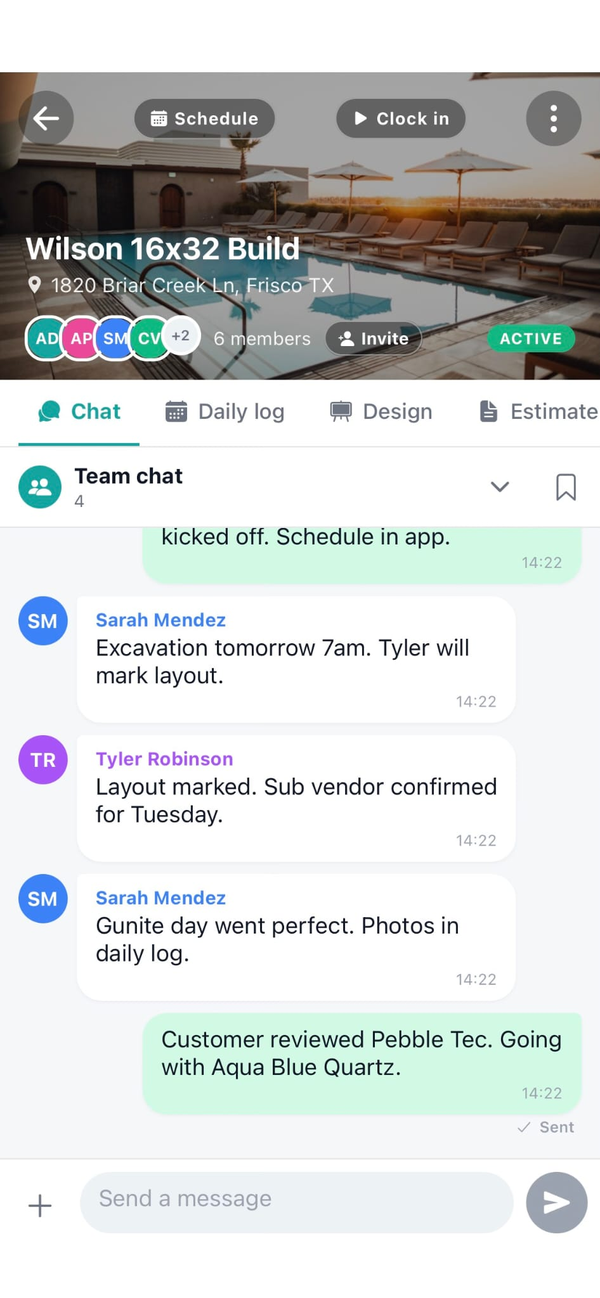
How is per-job chat different from group texts?
A group text is one giant thread for everything across every job and customer in your life. Chat in Workhand starts a new thread inside the specific job, so the message about Wednesday's pour on the Smith pool stays separate from the Garcia patio bid. Messages are searchable, photos render inline, and messages are organized by role so subs do not see the team's internal chat or other subs' messages. Six months later you can still find what the homeowner said on the change order.
Can subs see what the team is saying in chat?
No. Each job has separate channels for team, bids, and sub conversations. Subs see only the channel that includes their scope. The team channel where the office, foreman, and employees coordinate is invisible to subs. Subs on the same job cannot see each other's channels either. This is enforced at the database row level (RLS), not hidden in the UI, so there is no way around it.
Does the chat work for a solo contractor with no crew?
Yes. The most underrated use of per-job chat for solo operators is logging notes to yourself on a specific job. Tap into the Smith job's chat, post a message about the change order the homeowner verbally approved, attach a photo. Six months later when the customer asks about that change, you have the exact message with the timestamp and the photo. Solo contractors use it as a job journal that doubles as a customer-conversation record.
Can I attach photos to chat messages?
Yes. Take a new photo from inside the chat box or attach one from your camera roll. The photo renders inline in the conversation. Photos taken in chat also auto-link to the job's media library so foremen pulling up the job later can see all the visuals in one place. Photo attachments work offline and upload when signal returns.
How does the one-tap English/Spanish translation work?
Each user sets their preferred reading language once. When a message arrives in another language, a Translate button appears next to it. Tap and the message renders in your language. Your reply goes out in your language. Their app shows the Translate button to flip it back. English, Spanish, and Portuguese are supported. Saves the daily Google Translate tab dance on every jobsite that runs bilingual.
Does chat work offline?
Yes. Outgoing messages send offline and queue locally until signal returns. The message appears in the thread immediately on the sender's side so the conversation does not feel broken. When signal comes back, the queued message lands on the server and propagates to everyone else on the job in realtime. Photo attachments queue the same way.
Can I pin a message to the top of the thread?
Yes. Pin the change-order approval, the gate code, the homeowner's preferred work hours, or whatever you do not want to scroll for. Pinned messages show at the top of the job's chat regardless of how new messages push them down. Owners and admins can pin. Subs can read pins but cannot create them so the pinboard stays under your control.
Does the chat send carrier SMS or notifications only?
Chat is delivered over realtime websockets and push notifications, not carrier SMS. No SMS surcharges, no carrier deliverability issues, no separate phone number to manage. Push notifications grouped per job so the right people get pinged about the right work, without the noise of a single group text that buzzes every employee about every job.